Auto-Generated DDC Wiring Drawings — How Modern Engineering Tools Replace AutoCAD Drafting
Copied to clipboard ✓
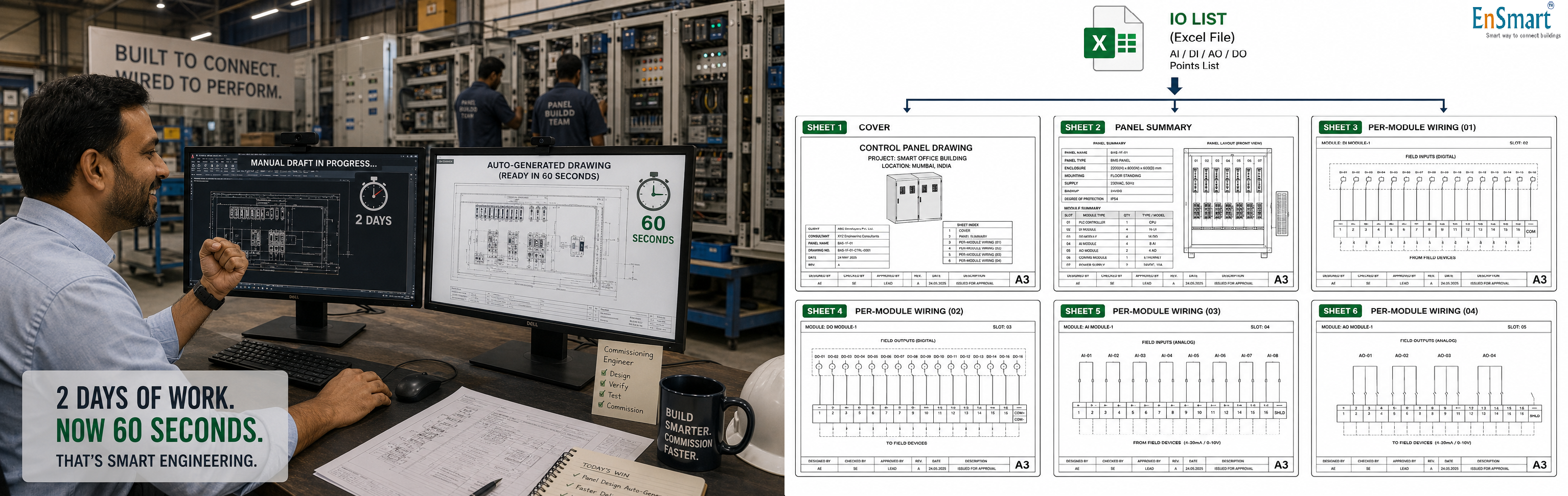
A Mumbai Panel-Build Floor, Two Days of Drafting Per Panel
Sachin is the senior commissioning engineer at a panel-build factory in Mumbai. His team produces DDC panels for projects across western India. Each panel ships with a full wiring drawing pack — cover sheet, panel summary, per-module wiring, terminal block layout, cable BoQ. For every project, the drafting team uses AutoCAD. The work is methodical, careful, and slow: ``` Sheet 1 Cover sheet 30 minutes Sheet 2 Panel summary 2-3 hours (terminal block math by hand, cable BoQ by hand, MCB count) Sheets 3-6 Per-module wiring 2 hours per module (typical project: 4-6 modules) Total time per panel: 1.5 to 2 days Mid-project changes: Customer changes 30 IO tags every sheet redrawn Add one new sensor on AHU-3 cable BoQ recalculated by hand per-module sheet redrafted Move sensor from DI-7 to DI-12 wiring lines redrawn, tag updated everywhere ``` A typical mid-size project — 9 panels, 5 modules each, average 30 mid-project tag changes — consumes two drafting engineers for three weeks. The drafting cost per project becomes a meaningful line on the channel partner's P&L. There is a faster way. Every single one of these problems has one solution — auto-generated wiring drawing packs from the same IO list that produced the BoQ.What Auto Wiring Drawing Generation Does
Modern engineering tools turn the structured IO list into a complete six-sheet drawing pack per panel — automatically, in under a minute. ``` Input Same IO list used for controller selection. Plus the controller + module mix already chosen by the auto-selection step. Tool produces (for each panel): Sheet 1 — Cover Sheet Project name, panel name, total module count List of every module (controller + IO modules) Module dimensions and identifiers (M1, M2, ...) Customer / consultant / vendor name boxes Drawing number, revision, date Sheet 2 — Panel Summary Total IO count (AI, DI, AO, DO) Terminal block calculation Single-deck terminal count Double-deck terminal count End terminals (start + end per group) Cable estimation table AI/AO cable: 4-core x 1 sq mm Al-Mylar shielded, min/max metres DI/DO cable: 2-core x 1 sq mm unshielded, min/max metres RS-485 cable: 2-core x 1.5 sq mm shielded, min/max metres Power cable: 3-core x 1.5 sq mm tinned twisted MCB count, power socket count, fuse note Cable specification table per IO type Sheets 3 to N — Per-Module Wiring Layout of each module (terminal blocks, dip switches) Power, RS-485, IO terminal labels IO tags per channel, full tag plus shortened display tag Example: AI1: DDC1AHU_M1_1_AI1 Cable specification annotation RS-485 daisy chain: arrow from CTRL to M1 to M2 ... to EOL Dip switch settings (baud, slave ID) Legend at the bottom (color codes for cable types) ``` The whole pack is generated in seconds. Every drawing has the same look-and-feel because they are produced by the same template engine.IO Tag Naming — The Magic of Bulk Find-and-Replace
Each IO point is auto-named using a four-part scheme: ``` PROJECT_PANEL_MODULE_CHANNEL Example: Project Sanmina_BMS Panel DDC_1_AHU Module M1 (the first IO module) Channel AI1 (analog input 1) Full tag: Sanmina_BMS_DDC_1_AHU_M1_AI1 Display: DDC1AHU_M1_AI1 (shortened for sheet readability) ``` When the customer asks for a tag change — say, the project name changes from "Sanmina_BMS" to "Whitefield_Tower_BMS" — the engineer uploads an Excel sheet with the find-replace pairs: ``` Find Replace Sanmina_BMS Whitefield_Tower_BMS DDC_1_AHU DDC_AHU_PLANT_01 DDC_3_Fire DDC_FAS_INTERFACE ``` The tool re-runs every drawing with the new tags. Six sheets per panel × nine panels = 54 sheets, all updated, all consistent, all named correctly. The work that used to take three days now takes thirty seconds.Cable Estimation — The Hidden Time Saver
Cable BoQ on a 9-panel project, done by hand: ``` For each IO point: Determine cable type by IO category (AI/AO shielded, DI/DO unshielded, RS-485 shielded, Power twisted). Estimate run length (min and max for the panel-to-equipment distance). Multiply by IO count. Sum across panels. Sum across cable types. Add 15-20 percent contingency. Re-do when any panel adds or removes an IO point. ``` Done automatically: ``` Tool reads: each IO point's category, panel-to-equipment distance assumption (10-20 metres typical per IO) Tool computes: per-cable-type total length, min and max Tool outputs: S.No Description Min Qty Max Qty 1 4C x 1 sq mm Al-Mylar Shielded 140 m 280 m (AI+AO points) 2 2C x 1 sq mm Al-Mylar Unshielded 290 m 580 m (DI+DO points) 3 2C x 1.5 sq mm Al-Mylar Shielded 20 m 40 m (RS-485 segments) 4 3C x 1.5 sq mm Tinned Twisted — — (As per panel location) ``` The cable BoQ is now a one-line addition to the project BoQ — accurate to the IO list.Terminal Block Math — Made Visible
Terminal block count is one of the most error-prone hand calculations in panel design: ``` Terminal block requirements per panel: AI: 2 terminals per AI point (signal + ref) AO: 2 terminals per AO point DI: 2 terminals per DI point (DI + 24V common) But sharing the 24V across DI group reduces count DO: 2 terminals per DO point Power: 3 terminals (24V + 0V + GND) RS-485: 6 terminals per chain (A+, B-, GND, in + out) End terminals: start + end per group Example for DDC_1_AHU (43 IO points + power + RS-485): Single-deck total: 77 terminals Double-decker total: 40 terminals End terminals: 14 ``` The tool produces both single-deck and double-deck options so the panel builder can choose based on price and panel real estate.What This Does for the Project
``` Time savings Manual drafting: 1.5-2 days per panel Auto-generated drawing: Under 1 minute per panel Time recovered (9 panels): 14-18 days of drafting Error reduction Manual: Tag mismatches between sheets, terminal block under-count, cable BoQ errors, DIP switch typos. Auto: Zero arithmetic errors. Tags 100 percent consistent across all sheets. Mid-project changes Manual: Each tag change is a manual sweep. 30 changes = 1-2 days of redraw. Auto: Find-replace via Excel; entire drawing pack regenerated in seconds. Document quality Manual: Every drafter has a slightly different style. Inconsistency across panels in the same project. Auto: One template, perfect consistency. ```When You Still Need a Human
``` Auto-generation handles: - Standard panel layouts - Terminal block math - Cable BoQ - IO tag naming and display - RS-485 daisy chain routing - Per-module wiring with controller-specific dimensions Human design still required for: - Non-standard panels (custom enclosures, special heat management, hazardous-area certifications) - Hand-off interfaces with FAS/ACS/MEP that need bespoke drawings - Site-specific cable routing (the auto cable BoQ is a starting estimate, not a routing plan) - Operator panel layouts and front graphics ``` The engineer's value moves to where it should be — design judgement, site knowledge, customer relationships — not terminal-block arithmetic.Why This Matters Now
Indian BMS projects are getting larger and shorter-cycle. A 9-panel project that used to bid in three weeks now bids in three days. The traditional drafting workflow does not scale to that pace. Auto-generated wiring drawings turn a one-week drafting bottleneck into a one-minute step — and let the channel partner respond to the new project pace without doubling drafting headcount. The IO list defines the panel. The auto-generated drawing pack documents it. Every line, every tag, every terminal block — produced once, edited everywhere by a single Excel sheet. Drafting becomes engineering — and the engineer goes home with the project complete, not the drawing started.Related Topics
- What is BMS integration? — how a BMS connects with VFDs, energy meters, BACnet/Modbus devices and other building systems
- How to design a BMS system step by step — the complete BMS design methodology covering site survey, IO list, controller selection, sequence of operations
- What is a Building Management System (BMS)? — fundamentals of BMS controls and architecture for HVAC, lighting, energy and access
- What is BMS commissioning? — the disciplined commissioning process that turns a BMS install into a working building brain
- Browse all IO List & Wiring topics — more from this section of the EnSmart BMS Library
Related Topics
- What is BMS integration? — how a BMS connects with VFDs, energy meters, BACnet/Modbus devices and other building systems
- How to design a BMS system step by step — the complete BMS design methodology covering site survey, IO list, controller selection, sequence of operations
- What is a Building Management System (BMS)? — fundamentals of BMS controls and architecture for HVAC, lighting, energy and access
- What is BMS commissioning? — the disciplined commissioning process that turns a BMS install into a working building brain
- Browse all IO List & Wiring topics — more from this section of the EnSmart BMS Library
Related Topics
- What is BMS integration? — how a BMS connects with VFDs, energy meters, BACnet/Modbus devices and other building systems
- How to design a BMS system step by step — the complete BMS design methodology covering site survey, IO list, controller selection, sequence of operations
- What is a Building Management System (BMS)? — fundamentals of BMS controls and architecture for HVAC, lighting, energy and access
- What is BMS commissioning? — the disciplined commissioning process that turns a BMS install into a working building brain
- Browse all IO List & Wiring topics — more from this section of the EnSmart BMS Library
Related Topics
- What is BMS integration? — how a BMS connects with VFDs, energy meters, BACnet/Modbus devices and other building systems
- How to design a BMS system step by step — the complete BMS design methodology covering site survey, IO list, controller selection, sequence of operations
- What is a Building Management System (BMS)? — fundamentals of BMS controls and architecture for HVAC, lighting, energy and access
- What is BMS commissioning? — the disciplined commissioning process that turns a BMS install into a working building brain
- Browse all IO List & Wiring topics — more from this section of the EnSmart BMS Library
Was this answer helpful?
✓ Thanks — your feedback was recorded.