Function Block Diagrams — How Every BMS Engineer Should Practise
Copied to clipboard ✓
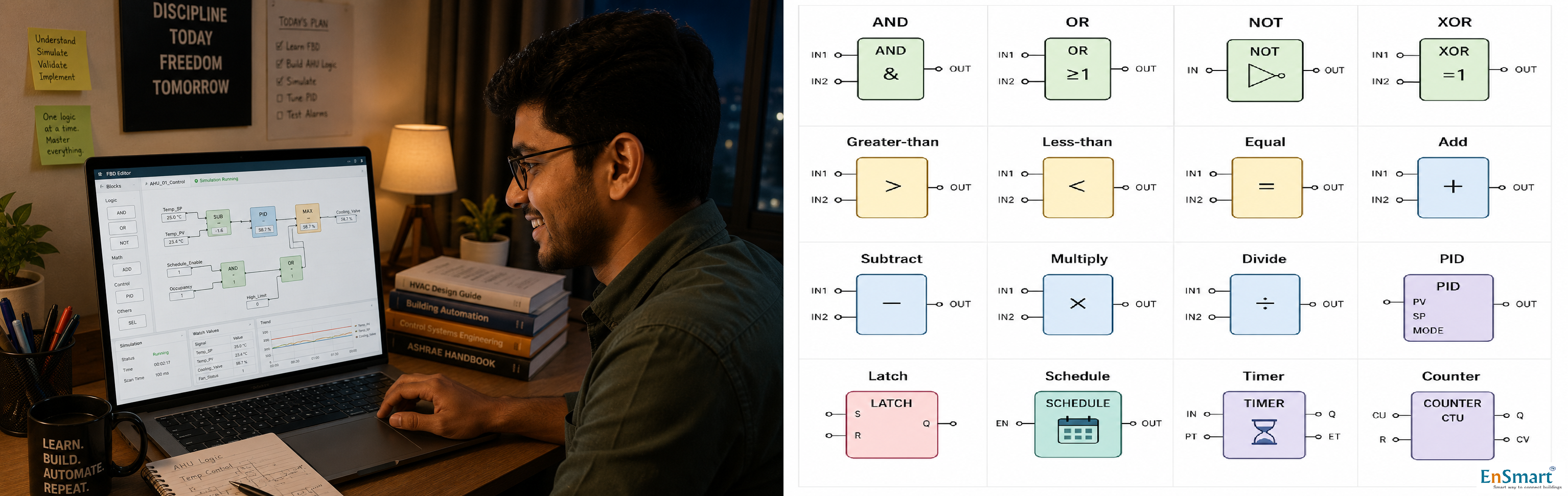
A Bengaluru Engineer at Home, Learning the Hard Way
Karthik has finished his MEP graduation. He has read about PID. He has memorised the Ziegler-Nichols tuning rules. He has watched 40 hours of videos on YouTube. He has never actually drawn a single function block diagram. ``` What Karthik knows in theory: - Proportional, Integral, Derivative - Logic gates: AND, OR, NOT, XOR - Comparators: greater than, less than, equal - Math blocks: add, subtract, multiply, divide - Schedules and calendars - Latches and timers What Karthik has never done in practice: - Drawn a PID loop - Watched the output settle after a setpoint change - Tuned a gain to remove oscillation - Connected a logic gate to a math block - Tested a schedule against a calendar - Saved his work and shared with a peer ``` Theory without practice is not engineering. It is reading. The traditional path to practice is closed: vendor tools require licences, dongles, and certifications. Karthik has none of those. Every single one of these problems has one solution — browser-based FBD simulators that any engineer can use, free.What an FBD Simulator Does
A function block diagram simulator is a browser-based tool that lets an engineer: ```- Drag blocks onto a canvas (PID, AND, OR, comparator, math, etc.)
- Connect block outputs to block inputs with lines.
- Set simulated input values (constants, sliders, time-varying signals).
- Click "Run" — the simulator evaluates the FBD continuously.
- Watch outputs change live in response to inputs.
- Tune block parameters (PID gains, deadbands, thresholds).
- Save the FBD as a portable JSON file.
- Reload, share with peers, port to a real controller later.
A Fresher's First Practice Session
Karthik's first session, on a Sunday afternoon in Bengaluru: ``` 14:00 Open the simulator 14:02 Drag an AI block (simulated input). Set value to "Return Air Temp", initial 26 °C. 14:04 Drag a constant block. Set to 22 °C — the setpoint. 14:06 Drag a PID block. Connect AI to PID's process variable input. Connect constant to PID's setpoint input. 14:08 Drag an AO block (simulated output). Connect PID output to AO. Label it "Cooling Valve %". 14:10 Click Run. Cooling Valve % climbs as PID drives the temp toward setpoint. Karthik watches the curve settle. 14:15 Set PID gain too high. Cooling Valve % oscillates. Temp oscillates around setpoint. Karthik sees the textbook diagram in action. 14:18 Drop the gain. Watch the response settle. 14:25 Add a noise source to the AI block. Watch the PID struggle to filter it. Add a low-pass filter block. Watch the noise fall away. 14:40 Karthik tries a freeze-protection interlock. AI for outside air temp. Comparator: < 5 °C → BV output "Freezestat" → forces cooling valve closed. Tests by dropping outside-air temp in the simulator. Sees the interlock fire. 15:30 Saves the FBD as a JSON file. Shares it on his peer WhatsApp group with the comment "this is what they teach in college as PID tuning, finally I get it." ``` In ninety minutes, Karthik has done more practical FBD work than his entire B.E. course allowed.Why the Simulator Matters
``` Theory without practice: - Karthik can answer exam questions on PID. - Karthik cannot diagnose an oscillating AHU on day one. - Karthik takes 6-12 months to become productive on a project. Practice without theory: - The engineer can wire it up but cannot reason about why. - Failure modes are mysterious. Practice with theory and a simulator: - The engineer sees the relationship between gain and response. - The engineer can fail safely — no real building is hurt. - The engineer arrives at site with intuition, not just notes. - Productive on a project in 6-8 weeks, not 12 months. ``` The simulator collapses the time between theory and intuition.The Block Library Every Engineer Should Master
``` Logic AND, OR, NOT, XOR, NAND, NOR Comparators >, <, ≥, ≤, =, ≠, between, deadband Math add, subtract, multiply, divide, average, min, max, absolute, square root Control PID, ramp, hold, integrator Time timer (on-delay, off-delay, pulse), counter, schedule, calendar Memory latch, set/reset, edge detector Conversion scale (4-20 mA to engineering units), enum to text, text to enum ``` A fresh engineer who can draw a control loop using each of these blocks has covered 90 percent of BMS programming patterns.Common Patterns to Practise
``` Pattern 1 — Single-loop PID AI (process variable) + setpoint → PID → AO (actuator) Tune to settle in 2-3 minutes without overshoot. Pattern 2 — Cascade control Outer PID controls room temp. Output is the setpoint for inner PID, which controls AHU supply temp. Inner loop responds fast, outer loop responds slow. Pattern 3 — Logic interlock Two BVs — fan-running and chiller-running. AND gate. Output drives the cooling-valve enable. Cooling valve only modulates if both fan and chiller are on. Pattern 4 — Schedule with override Schedule block outputs occupied/unoccupied. Operator override BV. OR gate selects which one drives the AHU mode. Pattern 5 — Lead-lag-standby Three pump BVs. Run-hour comparators choose lead and lag. Trip detection promotes lag to lead. Standby kicks in only if both fail. ``` A fresher who can draw all five patterns from memory is ready for project commissioning.JSON Portability — The Bridge to Real Controllers
The simulator's JSON export is the bridge between practice and project. The same JSON, with minor adjustments, can be loaded into a real controller. The logic the engineer practised at home runs in production. ``` JSON structure (simplified): { "blocks": [ {"id": "ai-1", "type": "AI", "label": "Return Temp", "scale": "..." }, {"id": "pid-1", "type": "PID", "kp": 2.5, "ki": 0.1, "kd": 0.05}, {"id": "ao-1", "type": "AO", "label": "Cooling Valve %"} ], "wires": [ {"from": "ai-1.value", "to": "pid-1.pv"}, {"from": "pid-1.output", "to": "ao-1.value"} ] } ``` A team can keep a library of standard JSON snippets — common AHU sequences, common chiller staging logic, common interlock patterns — and reuse them across projects.How Indian Engineering Capacity Grows
Indian construction needs more BMS engineers than the country currently has. The bottleneck has always been training — vendor tools cost lakhs, certifications take months, hands-on practice is gated. Browser-based FBD simulators dissolve the gate. A first-year engineer can practise on a Sunday. A fresh graduate can show a portfolio of working logic at the interview. A consulting firm can train 20 freshers in two weeks instead of two quarters. The math is simple: more practice → more capable engineers → more projects delivered well → more buildings running smart. The simulator is a small tool with a large multiplier. Function block diagrams are the alphabet of BMS programming. The simulator is the playground where engineers learn to spell. Drag, simulate, fail safely, repeat — and a fresh engineer arrives at the first project knowing what the screen is going to do before it does it.Related Topics
- What is BMS integration? — how a BMS connects with VFDs, energy meters, BACnet/Modbus devices and other building systems
- How to design a BMS system step by step — the complete BMS design methodology covering site survey, IO list, controller selection, sequence of operations
- What is a Building Management System (BMS)? — fundamentals of BMS controls and architecture for HVAC, lighting, energy and access
- What is BMS commissioning? — the disciplined commissioning process that turns a BMS install into a working building brain
- Browse all Control Loops & FBD topics — more from this section of the EnSmart BMS Library
Related Topics
- What is BMS integration? — how a BMS connects with VFDs, energy meters, BACnet/Modbus devices and other building systems
- How to design a BMS system step by step — the complete BMS design methodology covering site survey, IO list, controller selection, sequence of operations
- What is a Building Management System (BMS)? — fundamentals of BMS controls and architecture for HVAC, lighting, energy and access
- What is BMS commissioning? — the disciplined commissioning process that turns a BMS install into a working building brain
- Browse all Control Loops & FBD topics — more from this section of the EnSmart BMS Library
Related Topics
- What is BMS integration? — how a BMS connects with VFDs, energy meters, BACnet/Modbus devices and other building systems
- How to design a BMS system step by step — the complete BMS design methodology covering site survey, IO list, controller selection, sequence of operations
- What is a Building Management System (BMS)? — fundamentals of BMS controls and architecture for HVAC, lighting, energy and access
- What is BMS commissioning? — the disciplined commissioning process that turns a BMS install into a working building brain
- Browse all Control Loops & FBD topics — more from this section of the EnSmart BMS Library
Related Topics
- What is BMS integration? — how a BMS connects with VFDs, energy meters, BACnet/Modbus devices and other building systems
- How to design a BMS system step by step — the complete BMS design methodology covering site survey, IO list, controller selection, sequence of operations
- What is a Building Management System (BMS)? — fundamentals of BMS controls and architecture for HVAC, lighting, energy and access
- What is BMS commissioning? — the disciplined commissioning process that turns a BMS install into a working building brain
- Browse all Control Loops & FBD topics — more from this section of the EnSmart BMS Library
Was this answer helpful?
✓ Thanks — your feedback was recorded.