Modbus and BACnet Bus Scanners — What They Discover and Why Every Commissioning Engineer Needs One
Copied to clipboard ✓
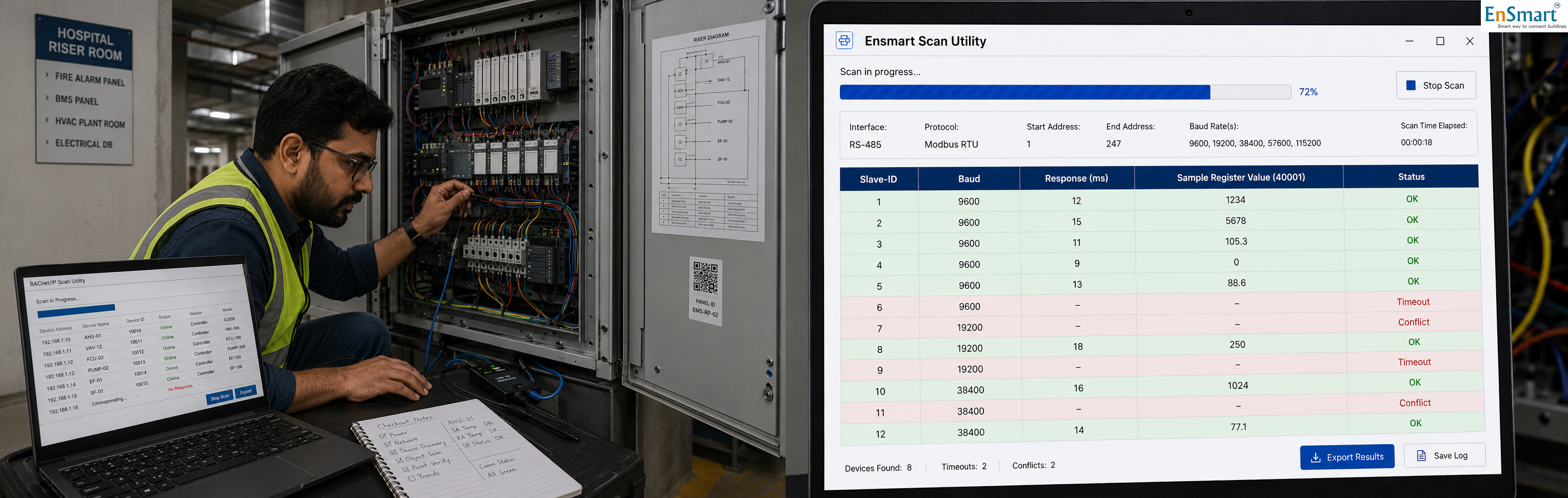
A Hyderabad Hospital Riser, 24 Devices, Zero Visibility
Pradeep is a commissioning engineer on a hospital BMS retrofit in Hyderabad. The riser room is small, hot, and crowded with cables. The panel inside has: ``` 18 Modbus RTU devices On a single RS-485 daisy chain 9 energy meters + 4 VFDs + 3 UPS units + 2 transfer switches 6 BACnet MS/TP devices On a separate RS-485 daisy chain 6 floor-level VAV controllers ``` Pradeep powers up. The front-end discovers some devices and not others. Specifically: ``` Discovered: 6 of 18 Modbus devices, 4 of 6 BACnet devices Not discovered: 12 Modbus devices, 2 BACnet devices Total invisible: 14 devices that should have been talking ``` The traditional troubleshooting flow: ``` Step 1 Check the wiring. Each device, each cable. 2 hours. Step 2 Verify slave IDs and MAC addresses. 1 hour with paperwork. Step 3 Verify baud rates. 1 hour with device-by-device login. Step 4 Swap suspected bad cables. 30 minutes per swap. Step 5 Replace suspected dead devices. 1 hour per swap. Step 6 Discover the actual cause was a slave ID conflict on the third device — after a full day. ``` A full day to find a five-minute problem. Every single one of these problems has one solution — a bus scanner that discovers every device on the bus in seconds.What a Bus Scanner Does
A Modbus / BACnet bus scanner is a small commissioning tool — sometimes a hardware device, sometimes a laptop application — that talks to every device on a bus and reports back what it finds. ``` For Modbus RTU: Procedure 1. Connect the scanner to the RS-485 chain. 2. Sweep slave IDs 1 through 247 at the configured baud rate. 3. For each ID that responds, read a sample register (typically register 0 or a manufacturer-specific identification register). 4. Build a report. Report (per device) Slave ID The actual ID that responded. Baud rate Confirmed by successful response. Response time Average milliseconds for the round trip. Sample value A sanity-check reading from a known register. Status OK / Timeout / CRC error / Conflict For BACnet MS/TP: Procedure 1. Connect the scanner to the RS-485 chain. 2. Send a Who-Is broadcast. 3. Capture I-Am responses from every device that hears. 4. For each device, read its Object_List. 5. Read a sample property from a known object. 6. Build a report. Report (per device) MAC address On the MS/TP segment. Device instance The BACnet device-instance number. Object count How many BACnet objects the device exposes. Sample read A successful read of one object's value. Status OK / Timeout / Routing issue ``` What used to be guesswork becomes a one-page table.The Common Faults a Scanner Reveals in Seconds
``` Slave ID conflict Symptom Some devices invisible. Scanner Two devices respond on the same ID with different register patterns. Conflict flagged. Fix Re-address one of them. Wrong baud rate Symptom Some devices respond, others time out. Scanner Sweep at multiple baud rates; the silent devices show up at a different baud than the chain default. Fix Reconfigure baud or split into two chains. Polarity reversal Symptom Random comms drops; sometimes works, sometimes does not. Scanner Inconsistent response timing; CRC errors logged. Fix Check A+ / B- wiring at each device. Termination missing Symptom Long chains (over 200 m) drop packets at random. Scanner Low-frequency CRC errors; high-data-rate failures. Fix Add 120-ohm resistor at far end. Dead device Symptom One device never responds. Scanner Confirms timeout at that ID after multiple retries. Fix Replace the device. Cable break Symptom Devices beyond a certain point on the chain are silent. Scanner All devices up to a point respond; everything after fails. Fix Inspect the cable at the boundary. ``` Each of these takes less than a minute to detect with a scanner. Each of them can take a full day to detect without one.Why Every Commissioning Engineer Should Carry One
``` Commissioning time per multi-vendor panel: Without scanner 6-10 hours (guessing per fault) With scanner 1-2 hours (faults visible immediately) Time saved per panel 4-8 hours Project schedule impact: Without scanner 1-2 days slip per project for bus issues With scanner On schedule Customer perception: Without scanner "The integrator doesn't know what is wrong" With scanner "The integrator showed me exactly what was wrong and fixed it in twenty minutes" ``` A scanner is the smallest tool with the largest impact on commissioning quality.A Sample Scan Output — Pradeep's Riser
When Pradeep brings a scanner into the riser room, the scan completes in 90 seconds: ``` Modbus chain (1 of 1) — 9600 baud — 1200 m segment Slave ID Status Baud Resp(ms) Sample Reg Notes 1 OK 9600 12 50012=2400 Energy meter (kWh) 2 OK 9600 13 50012=1850 Energy meter 3 CONFLICT 9600 — — Two devices same ID 4 OK 9600 12 50012=3200 5 TIMEOUT — — — Suspect dead or wrong baud 6 OK 9600 13 40010=145 VFD (speed Hz) 7 TIMEOUT — — — 8 OK 9600 12 50012=890 9 TIMEOUT — — — 10 OK 9600 13 40010=0 VFD (stopped) 11-15 TIMEOUT — — — All silent — chain break? 16 TIMEOUT — — — 17 OK 9600 14 40010=120 VFD 18 CONFLICT 9600 — — Same ID as device 3 above BACnet MS/TP chain (1 of 1) — 38400 baud MAC Device Instance Status Object Count Notes 1 100201 OK 43 VAV F1-A 2 100202 OK 43 VAV F1-B 3 100203 OK 43 4 100204 OK 43 5 TIMEOUT — — Possible dead or unaddressed 6 TIMEOUT — — Possible dead or unaddressed Issues detected: - Slave IDs 3 and 18 are configured to the same address. Reassign one. - Slave IDs 5, 7, 9, 11, 12, 13, 14, 15, 16 are silent. Pattern suggests a cable break between device 4 and device 5. - BACnet MAC 5 and 6 are silent. Likely unaddressed at site. Recommended actions: 1. Inspect the RS-485 cable between devices 4 and 5 — likely broken connection. 2. Re-address device 18 to slave ID 19. 3. Configure MS/TP MAC addresses on the two silent VAVs. ``` Total scan time: 90 seconds. Total time to fix all three issues: under one hour. Total project time saved: a full day.Beyond Discovery — Continuous Health
Modern bus scanners do more than commissioning. They monitor the bus continuously and alert when devices drop, timing degrades, or a new device appears unexpectedly. ``` Continuous monitoring features: - Alert when a device's response time exceeds a threshold (could indicate cable degradation). - Alert when a device appears that was not in the baseline (security event — unauthorised connection). - Alert when a device disappears (failure or disconnect). - Trend response time over weeks for predictive maintenance. ``` Bus health becomes part of the BMS dashboard, not a hidden problem that surfaces only when something fails.When the Scanner Is Most Valuable
``` At commissioning The biggest time-saver. Find the fault in seconds, not days. After site changes Any time a new device is added or a cable is moved. Confirm nothing else broke. At handover Document the bus health to the customer. Helps with operator training. At troubleshooting Years later, when a tenant reports a problem. Confirm whether the bus is healthy before blaming the application logic. ``` A scanner shifts the diagnostic question from "what could be wrong?" to "what does the scan say is wrong?" That single shift saves the average commissioning engineer many days per year. A bus is a black box without a scanner. A scanner makes the black box transparent. Every commissioning engineer should carry one — the cost of the tool is recovered on the first project, and the engineer's reputation is protected on every project after.Related Topics
- What is BMS integration? — how a BMS connects with VFDs, energy meters, BACnet/Modbus devices and other building systems
- How to design a BMS system step by step — the complete BMS design methodology covering site survey, IO list, controller selection, sequence of operations
- What is a Building Management System (BMS)? — fundamentals of BMS controls and architecture for HVAC, lighting, energy and access
- What is BMS commissioning? — the disciplined commissioning process that turns a BMS install into a working building brain
- Browse all Protocols topics — more from this section of the EnSmart BMS Library
Related Topics
- What is BMS integration? — how a BMS connects with VFDs, energy meters, BACnet/Modbus devices and other building systems
- How to design a BMS system step by step — the complete BMS design methodology covering site survey, IO list, controller selection, sequence of operations
- What is a Building Management System (BMS)? — fundamentals of BMS controls and architecture for HVAC, lighting, energy and access
- What is BMS commissioning? — the disciplined commissioning process that turns a BMS install into a working building brain
- Browse all Protocols topics — more from this section of the EnSmart BMS Library
Related Topics
- What is BMS integration? — how a BMS connects with VFDs, energy meters, BACnet/Modbus devices and other building systems
- How to design a BMS system step by step — the complete BMS design methodology covering site survey, IO list, controller selection, sequence of operations
- What is a Building Management System (BMS)? — fundamentals of BMS controls and architecture for HVAC, lighting, energy and access
- What is BMS commissioning? — the disciplined commissioning process that turns a BMS install into a working building brain
- Browse all Protocols topics — more from this section of the EnSmart BMS Library
Related Topics
- What is BMS integration? — how a BMS connects with VFDs, energy meters, BACnet/Modbus devices and other building systems
- How to design a BMS system step by step — the complete BMS design methodology covering site survey, IO list, controller selection, sequence of operations
- What is a Building Management System (BMS)? — fundamentals of BMS controls and architecture for HVAC, lighting, energy and access
- What is BMS commissioning? — the disciplined commissioning process that turns a BMS install into a working building brain
- Browse all Protocols topics — more from this section of the EnSmart BMS Library
Was this answer helpful?
✓ Thanks — your feedback was recorded.