Modbus RTU vs Modbus TCP — Wires vs Network
Copied to clipboard ✓
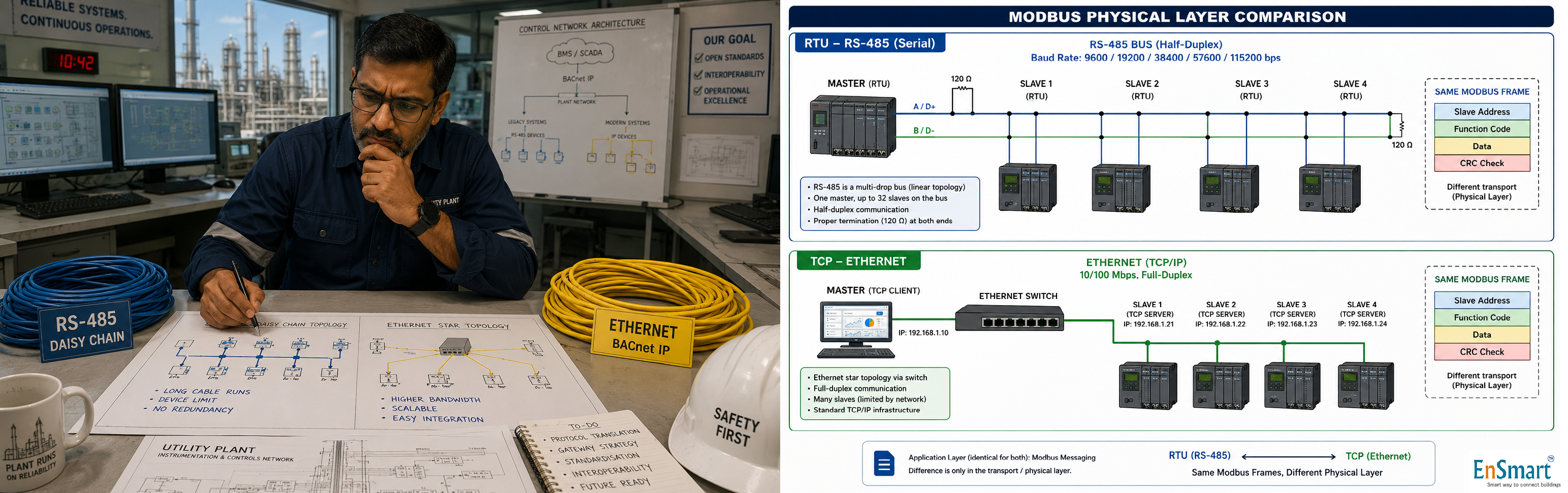
A Vizag Utility Plant, 47 Devices, Two Cable Types
Krishna is a senior commissioning engineer on a refinery utility plant in Visakhapatnam. The plant has 47 Modbus devices spread across three buildings: ``` Substation 1 12 energy meters RS-485 daisy chain Substation 2 8 energy meters RS-485 daisy chain (different chain) Cooling tower 3 VFDs RS-485 daisy chain Pump house 4 VFDs + 4 starters Modbus TCP over Ethernet Switchgear 8 protective relays Modbus TCP over Ethernet 8 LV monitors Modbus TCP over Ethernet ``` The supervisor calls every meeting "the Modbus problem". He confuses RTU and TCP at every status update. The contractor shrugs every time he is asked which one is failing. Krishna decides to write a one-page primer for the team. Every single one of these problems has one solution — knowing what RTU and TCP each are, and where each belongs.The Same Protocol, Two Different Physical Worlds
Modbus is one application-layer protocol. The same registers, the same function codes, the same master-slave model. But it can ride on two very different physical layers — and engineers who confuse the two waste days. ``` Modbus RTU ───────────────────────────────────────── Physical layer RS-485 — two-wire (A+ and B-) plus a common ground. Daisy-chain topology. Up to 32 devices typical (1200 metre limit at low baud). Speed 9600 to 115200 baud. 9600 and 19200 are most common in BMS field deployments. Addressing Slave ID (1-247). Each slave on a chain must have a unique ID. Frame format Slave ID + Function code + Data + 16-bit CRC. No header, no preamble. Compact and fast on serial. Wiring Twisted pair, shielded. 120-ohm termination at both ends of the chain. Polarity matters. Modbus TCP ───────────────────────────────────────── Physical layer Ethernet — CAT5/6 with RJ45. Star or mesh topology. Switches and routers, like any IT network. Speed 10/100/1000 Mbps. Effectively limited by the application, not the wire. Addressing IP address (each device has a unique IP). Slave ID is also present (called Unit Identifier in TCP) for backward compatibility. Frame format MBAP header (Transaction ID + Protocol ID + Length + Unit ID) + PDU. No CRC — TCP/IP handles error detection at lower layers. Wiring Standard Ethernet patch cables. No polarity issue. No terminations. ``` The same controller can speak both — RTU on the RS-485 port, TCP on the Ethernet port.When to Use Which
``` Use Modbus RTU when: - Devices are clustered (energy meters in a panel, VFDs near a pump). - Distance is moderate (under 1200 metres). - Cost matters — RS-485 cable is cheap. - Number of devices per chain is small (under 32). - Polling rate is slow (1-5 seconds per device acceptable). Use Modbus TCP when: - Devices are spread across the building or campus. - The IT team is happy to assign IPs. - Polling needs to be fast (multiple devices per second). - You already have an Ethernet backbone. - You want easier diagnostics — Ethernet switches show link state. ``` For Krishna's site, RTU at the substations and cooling tower is right (energy meters and VFDs are clustered). TCP at the pump house and switchgear is right (devices are scattered, polling rate matters for protective relays).Common Pitfalls
``` RTU pitfalls ───────────────────────────────────────── Wrong polarity A+ wired to B- and vice versa. No comms. Swap and retest. Missing biasing Long chain, no idle-state bias. Random comms drops. Add 680-ohm pull-up/pull-down. No termination 120-ohm resistor missing at one or both ends. Reflections, packet loss. Slave ID conflict Two devices configured same ID. Only one responds; the other is invisible. Baud rate mismatch Some devices at 9600, some at 19200 on the same chain. Half work. Cable too long Over 1200 metres at 19200 baud. Errors increase. Drop baud or split into segments. TCP pitfalls ───────────────────────────────────────── IP address collision Two devices same IP. Both vanish from the master. Unit Identifier wrong Some devices ignore Unit ID; others use it to multiplex multiple devices over one IP (gateway-style). Check the device manual. Firewall blocks 502 Default Modbus TCP port is 502. Corporate IT may block it. Open port 502 explicitly. TCP connection limit Some devices accept only one TCP connection at a time. Multiple masters cause refused connections.
Diagnostic Tools


A bus scanner tool is the fastest way to find the source of a problem on either physical layer:
How Krishna Cleans Up the Site
Krishna writes: ``` Substation 1 chain 9600 baud, A+ B-, 120-ohm both ends, 12 slave IDs Substation 2 chain 9600 baud, A+ B-, 120-ohm both ends, 8 slave IDs Cooling tower chain 19200 baud, A+ B-, 120-ohm both ends, 3 slave IDs Pump house TCP IPs 192.168.20.11 to .18, port 502 Switchgear TCP IPs 192.168.20.21 to .36, port 502 ``` He prints this on a single A4 sheet. He sticks it inside the BMS panel door. The next time the supervisor asks "the Modbus problem", everyone points at the sheet and the conversation moves on. Same protocol. Two physical worlds. The engineer who knows the difference fixes the chain in minutes — not days.Related Topics
- What is BMS integration? — how a BMS connects with VFDs, energy meters, BACnet/Modbus devices and other building systems
- How to design a BMS system step by step — the complete BMS design methodology covering site survey, IO list, controller selection, sequence of operations
- What is a Building Management System (BMS)? — fundamentals of BMS controls and architecture for HVAC, lighting, energy and access
- What is BMS commissioning? — the disciplined commissioning process that turns a BMS install into a working building brain
- Browse all Protocols topics — more from this section of the EnSmart BMS Library
Related Topics
- What is BMS integration? — how a BMS connects with VFDs, energy meters, BACnet/Modbus devices and other building systems
- How to design a BMS system step by step — the complete BMS design methodology covering site survey, IO list, controller selection, sequence of operations
- What is a Building Management System (BMS)? — fundamentals of BMS controls and architecture for HVAC, lighting, energy and access
- What is BMS commissioning? — the disciplined commissioning process that turns a BMS install into a working building brain
- Browse all Protocols topics — more from this section of the EnSmart BMS Library
Related Topics
- What is BMS integration? — how a BMS connects with VFDs, energy meters, BACnet/Modbus devices and other building systems
- How to design a BMS system step by step — the complete BMS design methodology covering site survey, IO list, controller selection, sequence of operations
- What is a Building Management System (BMS)? — fundamentals of BMS controls and architecture for HVAC, lighting, energy and access
- What is BMS commissioning? — the disciplined commissioning process that turns a BMS install into a working building brain
- Browse all Protocols topics — more from this section of the EnSmart BMS Library
Related Topics
- What is BMS integration? — how a BMS connects with VFDs, energy meters, BACnet/Modbus devices and other building systems
- How to design a BMS system step by step — the complete BMS design methodology covering site survey, IO list, controller selection, sequence of operations
- What is a Building Management System (BMS)? — fundamentals of BMS controls and architecture for HVAC, lighting, energy and access
- What is BMS commissioning? — the disciplined commissioning process that turns a BMS install into a working building brain
- Browse all Protocols topics — more from this section of the EnSmart BMS Library
Was this answer helpful?
✓ Thanks — your feedback was recorded.